WAN connectivity
OneOS6 routers can connect to a Wide Area Network (WAN) using different physical access technologies, depending on the hardware model and the services provided by the Internet Service Provider (ISP).
The following WAN access technologies are supported:
Ethernet
Connects the site to the WAN using a standard Ethernet connection. Routers equipped with Ethernet interfaces (electrical or optical) support this type of WAN access.
xDSL (ATM or EFM)
Connects the site to the WAN through a DSL service over copper infrastructure. This type of WAN access requires a router equipped with an xDSL controller.
Cellular (4G or 5G)
Connects the site to the WAN through a mobile network using a SIM card. This type of WAN access requires a router equipped with an integrated cellular module.
Although these technologies differ in how the router physically connects to the provider network, they all serve the same purpose: providing IP connectivity between the router and the WAN.
Understanding WAN Connectivity
An SD-WAN router can access the WAN in two different ways:
Direct WAN connectivity, where the WAN service is connected directly to the router.
WAN Connectivity Through an External Device, where a modem, gateway, or provider-managed router delivers Ethernet connectivity to the SD-WAN router.
The following design illustrates these deployment models.
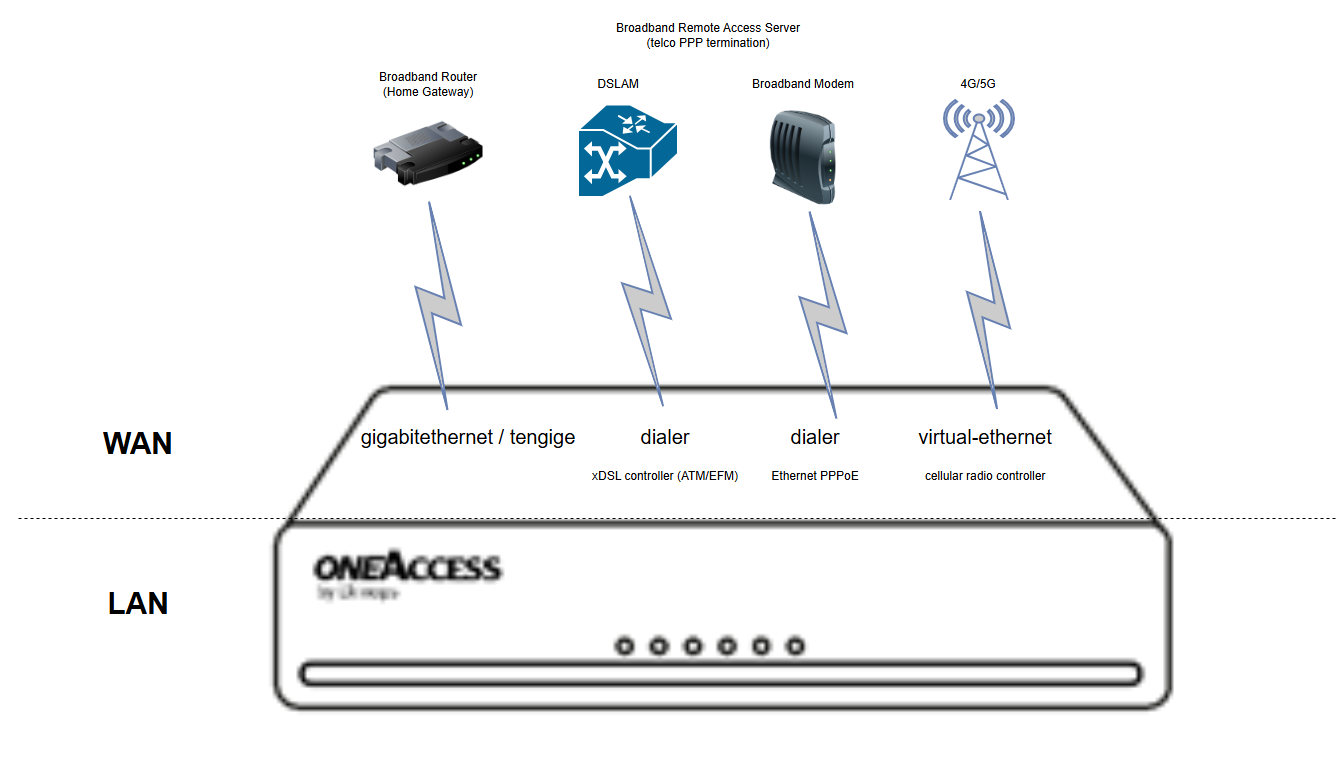 |
Typical SASE Box WAN Deployment
For SASE Box hardware models, the most common deployment model is to obtain WAN connectivity through an external broadband router.
In branch offices, this external device is typically a home gateway or ISP-provided router. In data center environments, WAN access is often provided through a service-provider-managed router.
In these scenarios, the SD-WAN router connects to the external device through an Ethernet interface and relies on that device to provide WAN access.
In a direct WAN deployment, the router connects directly to the service provider network using one of its built-in WAN interfaces.
Physical WAN access can be provided through:
An xDSL line connected directly to the router's DSL interface.
A SIM card installed in the router for 4G or 5G access.
An Ethernet service connected directly to an Ethernet WAN port (UTP or SFP).
In this scenario, the router is responsible for establishing and maintaining the WAN connection.
In some deployments, the WAN service is terminated by an external device before reaching the router.
Typical examples include:
A broadband router or home gateway
A service provider managed router gateway
The external device provides Ethernet/IP connectivity to the SD-WAN router, which uses this Ethernet connection as its WAN access.
From the router's perspective, the WAN is accessed through an Ethernet interface while the external device handles the underlying WAN connection.
Before a router is delivered, the service provider or integration partner associates the device with the appropriate hardware model and, when required, prepares WAN-specific settings.
Some WAN services use PPP (Point-to-Point Protocol) to authenticate the customer and establish the connection to the service provider network. For these services, the required parameters may already be configured on the router before delivery.
These provisioning operations are performed outside of the customer portal.
As a customer, you only see the interfaces available on your router and can configure interface-level networking parameters, such as IP addresses.
Interface Name | WAN Connectivity | Interface configuration | IP configuration |
|---|---|---|---|
gigabitethernet | IP over Ethernet | Hardware model (Director) | Static or dynamic (DHCP) |
tengige | IP over Ethernet | Hardware model (Director) | Static or dynamic (DHCP) |
virtual-ethernet | IP over 4G/5G | Hardware model (Director) | Assigned by the mobile operator (APN and credentials) |
dialer | IP over PPPoE/(VLAN)-Ethernet | Router factory (staging) | Not managed by Director |
dialer | IP over PPPoE/(VLAN)-EFM/SHDSL-VDSL | Router factory (staging) | Not managed by Director |
dialer | IP over PPPoA/ATM/ADSL | Router factory (staging) | Not managed by Director |